Sunday, 30 September 2012

Google Adsense Work With SEO

That's Right Google Adsense not work without market and organic Marketing called SEO, You know all our the worlds peoples are searching specially Americans they are using Google and they search in Google.com, google is not a search engine its also making money machine, google always teach you how to get your blog or website come top in google search and they also another side launch Google Panda updates, Google Penguin update. Long Story short friends if you need traffics so you need seo, and seo is base on Keywords which is we search in our google searches,

There is Two Types of Searches
  1. Short Tail Keywords
  2. Long Tail Keywords
Short Tail Keywords:
The short tail keywords are base on one single words like "download" or "Money", google also seo those keywords but its very costly and very long time taking process because google crawlers are looking for back links against sort tail keywords if third party website redirect your website with against short tail keywords its mean you have do-follow links, which is good for seo.

Long Tail Keywords:
The Long Tail Keywords are base on two or three words mean "google adwords account" or "make money with adsense" or "Google Adsense Tips Top Paying Keywords" those keywords are called long tail keywords google also these website index very quickly and you get traffic on your website very fast. this method is very good for your website.

Saturday, 29 September 2012

Adding New Slides To A PowerPoint Presentation...!

                          POWER POINT...!

PowerPoint is the powerful and ubiquitous presentation program from Microsoft. It gives you the facility to create stunning presentations that incorporate video and PowerPoint animations. The image editing capabilities that PowerPoint offer get better and better with every new version. Starting to learn Microsoft PowerPoint can seem like a daunting task if you are not familiar with its environment. The tutorials you see listed on this page are designed to take beginners by the hand and to teach them the basics of using the program. As you gain confidence, more advanced subjects will be explained. Before you know it, you'll be a Microsoft PowerPoint guru and you'll be helping out other people who are beginners themselves.


    Adding New Slides To A PowerPoint Presentation


There are a couple of ways to add a new slide. In each way, the slide that is currently selected is important as the new slide will be placed after the selected one. This means that if you want to insert a slide before the end of the presentation, you will need to select the slide that appears before the one you want to insert. To select the slide, just click on it. You can select the slide in whichever view you happen to be using, whether it's Slides View or Outline View.

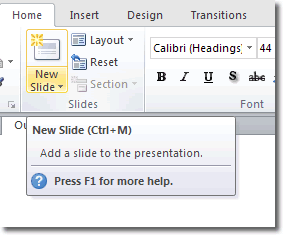
Once you have selected a slide, click Home > Slides > New Slide. You'll notice that the New Slide button is in two halves.


If you click the top half of the New Slide button, the default Title and Content type slide will be added. If,instead, you click the bottom half of the button, you will be able to select what type of slide is added.


Once the new slide has been added, you can click into one of the editable content boxes to make your changes.

The keyboard shortcut for adding new slides is ctrl-m....also chek how to create PowerPoint presentation...

PS.leave your thoughts comments views question and suggestion for me in the comment box below thanx....!

Related Posts Plugin for WordPress, Blogger...
Top Technology-Internet Sites Free web directory Free Automatic Backlink Ping your blog, website, or RSS feed for Free